Wedding Peonies Flowers Bouquet: A Guide to Floral Elegance
Understanding the Visual Appeal of Wedding Peonies
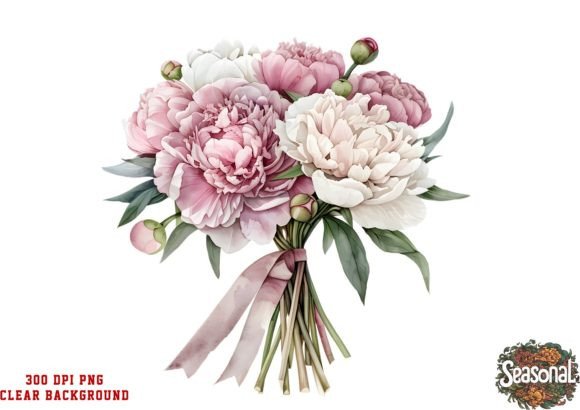
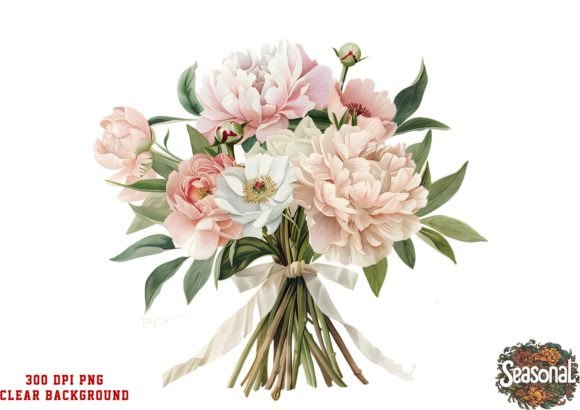
There’s a specific feeling that a well-curated floral element brings to a design. It’s more than just a picture of a flower; it’s about texture, color, and the emotion it evokes. The Wedding Peonies Flowers Bouquet is a prime example of this. At its core, it’s a single, high-resolution clipart asset designed to serve as a cornerstone for spring and wedding-themed projects. But to call it just a "flower graphic" would be an understatement. It’s a carefully crafted piece that captures the lush, full, and romantic essence of peonies at the peak of their bloom.
Visually, the bouquet is a study in balanced abundance. Peonies are known for their dense, ruffled petals, and this clipart translates that texture beautifully. You’ll notice a blend of soft, creamy whites and gentle pinks, with subtle hints of deeper blush tones that give the flowers depth and dimension. This isn't a flat, cartoonish rendering. It has a painterly quality that feels both authentic and polished. The composition is key—it’s not a single stem but a gathered arrangement, which immediately suggests celebration, care, and a curated aesthetic. This makes it incredibly versatile for backgrounds, focal points, or accent pieces in a larger layout.
Where This Floral Asset Truly Shines
The real strength of an asset like the Wedding Peonies Flowers Bouquet lies in its adaptability. As a designer or content creator, you’re always looking for elements that can be repurposed across a campaign without feeling repetitive. This single PNG file, with its transparent background, is built for that. Its high-resolution 300 DPI ensures it looks sharp whether you’re scaling it down for a social media icon or blowing it up for a printed poster.
Think about the practical applications. For a wedding stationer, this bouquet becomes the hero image on an invitation suite, a delicate watermark on the RSVP card, and a cohesive motif across thank-you notes and menu cards. For a small business owner in the beauty or lifestyle space, it can elevate product packaging, create stunning blog post headers, or add a touch of seasonal freshness to email newsletters. The design seamlessly blends into large areas, making it ideal for creating those elegant, full-bleed backgrounds that are so popular in modern editorial design and social media graphics.
Beyond weddings, its "preppy" and bright spring personality makes it a perfect fit for Easter promotions, Mother's Day campaigns, or any project that needs a burst of organic, cheerful energy. It’s a classic example of a design asset that carries its own personality, allowing you to set a specific tone—be it romantic, joyful, or sophisticated—with a single element.
Integrating the Bouquet into Your Design Workflow
Having a beautiful asset is one thing; knowing how to use it effectively is another. The key to working with a strong floral element like this is to treat it as part of a system, not just a standalone decoration. Let’s break down a practical approach.
First, consider your font pairing. A bouquet with this much intricate detail pairs best with typefaces that offer clear contrast. A clean, geometric sans serif font for body text will provide a modern, readable counterpoint to the organic shapes. For headlines or logos, you could opt for an elegant serif font to lean into the classic wedding aesthetic, or a refined script font to mimic the fluidity of the petals. The goal is to create a visual hierarchy where the text and the floral element support each other, rather than compete.
Next, think about your brand identity. If you’re a wedding planner or a boutique bakery, using this bouquet consistently across your materials can become a recognizable part of your brand’s visual language. It helps build a cohesive world that your clients can step into. For a blogger, it can define the aesthetic of a seasonal content series, making your posts instantly identifiable in a crowded feed.
Finally, a note on practicality. This is a commercial font and asset, meaning you can use it in projects for sale. Always double-check the license to ensure it covers your specific use case, especially for large-scale commercial products. Test the asset in your design software of choice—be it Canva, Photoshop, or Affinity—to see how it interacts with your color palette and layout grid. A quick mock-up can save you hours of revision later. By approaching it with this strategic mindset, the Wedding Peonies Flowers Bouquet transforms from a simple clipart into a powerful tool for storytelling and brand building.